Hosting my own pictures with Garage
 NINikki Sophie 🌸5 min read0 views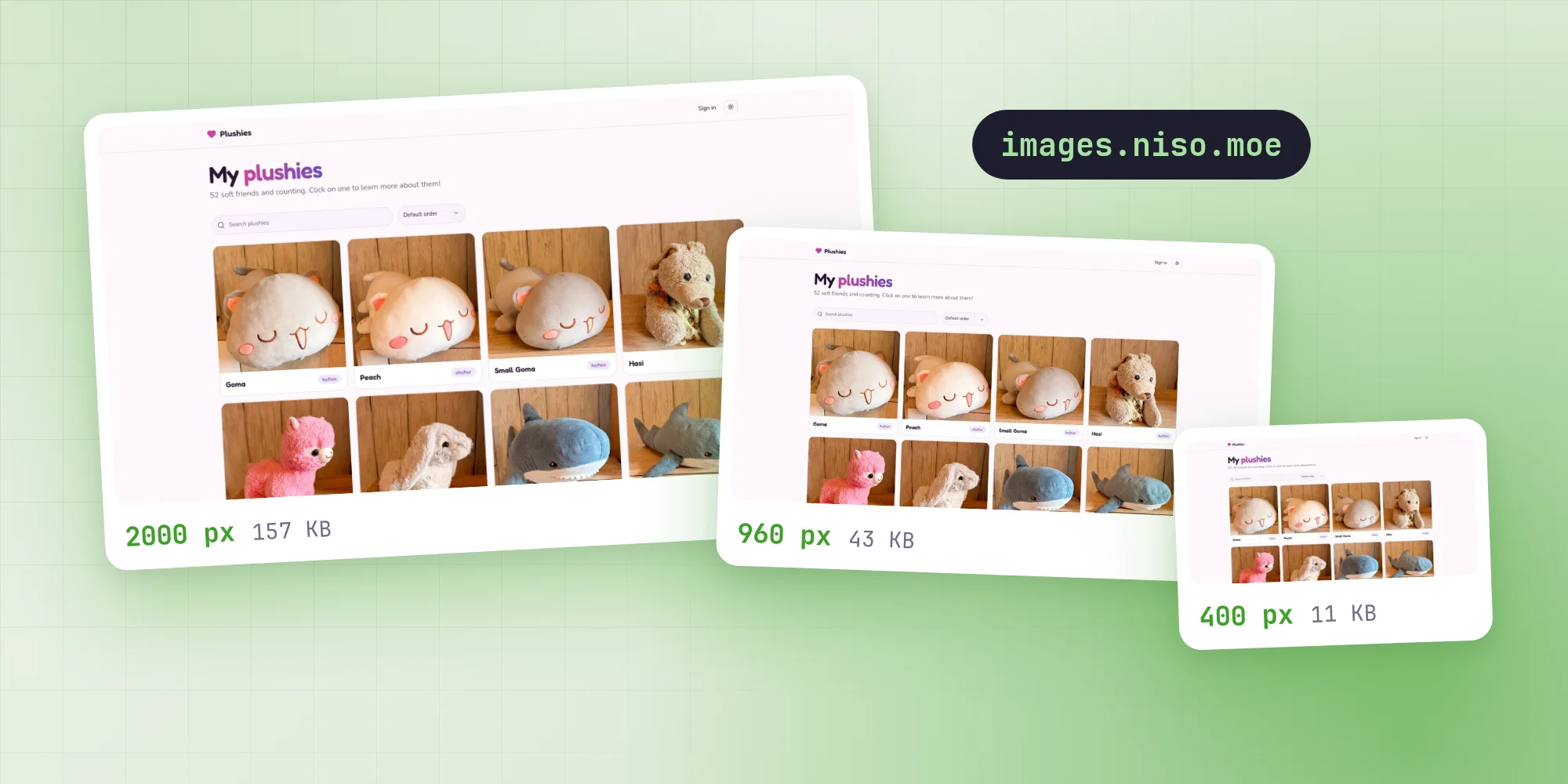
Every cover and project picture on this site lives on my own server. It runs Garage, an S3-compatible object store, and serves the files from images.niso.moe. The photos for my plushies site sit in the same bucket. I wanted to see what it takes to do this without a hosted image service.
Two addresses for one bucket
Garage speaks the S3 API, so the site talks to it with requests signed by the aws4fetch library. Uploads, listings and deletes go through that API, which takes the bucket name in the path. Reading is simpler: the bucket is also served as a website on images.niso.moe, so a picture's address is just the domain and its key. For local work, both addresses can point at any other S3-compatible test server.
Three sizes, made in the browser
When I pick a picture in the dashboard, the browser resizes it before anything is sent. It draws the picture onto a canvas three times, so its longest side is at most 400, 960 or 2000 pixels: a thumbnail for small previews, a small copy for cards and phones, and a large one for big screens. Pictures are never scaled up. Each copy is saved as WebP at quality 0.85.
Some browsers can't write WebP and quietly hand back a PNG instead. So if the first copy comes back as the wrong type, all three are made as JPEG. Rotation from the camera's EXIF data is applied, and an animated GIF keeps its first frame.
The resizing happens in the browser because nothing else on the way would do it. The copies go straight to storage without passing through the site, and Next.js image optimization is turned off here, since Vercel bills every image transformation. The original file never leaves my computer.
The copies are sent one after another with XMLHttpRequest rather than fetch, because only XHR reports upload progress, which drives the percentage shown while a picture uploads.
Upload links that accept one file
The browser never gets storage keys. It asks a server action for upload links, sending only the file type and the size of each copy. The action checks that I'm signed in as a writer or admin, that the type is WebP or JPEG, and that each copy weighs more than nothing and at most 8 MB. Then it signs one PUT link per copy:
export async function signUpload(objectKey: string, type: string, size: number) {
  const url = apiUrl(objectKey);
  url.searchParams.set('X-Amz-Expires', String(UPLOAD_LINK_SECONDS));

  const signed = await storage().sign(url.href, {
    method: 'PUT',
    headers: { 'content-type': type, 'content-length': String(size) },
    aws: { signQuery: true, allHeaders: true },
  });

  return signed.url;
}
The content type and length are part of the signature, so a link only accepts the exact file it was made for. It also expires after 300 seconds: plenty to send one picture, too short to keep around.
Each picture gets a new random UUID as its folder, with the three copies inside as thumb, small and large. The database only stores the large copy's address. The other two are found by swapping the file name.
One folder per database
All of this site's pictures go under a folder named after the database they belong to:
function uploadFolder() {
  const database = new URL(process.env.DATABASE_URL ?? 'postgresql://unknown');
  const owner = createHash('sha256')
    .update(database.host + database.pathname)
    .digest('base64url')
    .slice(0, 12);

  return `portfolio/${owner}`;
}
The name is the first 12 characters of a SHA-256 hash of the database's host and name. My local test database gets a different folder from the live site, so it can never delete one of the live site's pictures. The plushies site's photos in the same bucket are out of reach entirely.
Only my own addresses
Forms send picture addresses back from the browser, so the server doesn't trust them. Before saving a cover or a gallery picture, and before deleting anything, it checks the address. It must start with images.niso.moe, end in large.webp or large.jpg, and be a picture folder directly inside this database's folder. Anything else is dropped from the form, or ignored when deleting. The link preview renderer has a similar rule and only fetches covers from the site's own image server.
Cleaning up
Pictures nothing uses anymore get deleted, at several points:
- When a post or project is saved with a picture replaced or removed, the old one is deleted once the response has been sent. Deleting a post or project takes its pictures with it.
- When I replace or remove a picture I uploaded in the same form before saving, it goes right away.
- When a tab with unsaved changes closes, the browser sends the new pictures' addresses with
navigator.sendBeacon, since a server action can't finish while the page is going away. - Opening the dashboard's Media page sweeps out unused pictures older than a day, at most once an hour per server. The page also lists unused pictures with a Clean up button that removes them whatever their age.
Before the form cleanups delete anything, the server checks whether it is still in use: as a post cover, a project cover or dark cover, a gallery picture, or an address written into a post's or project's text. Deleting a picture lists its folder and removes every copy in it, and a file that is already gone counts as deleted. Uploads that never finished, and so have no large copy, are swept up too.
Showing them
On the site, pictures go through one small component, StoredImage. It renders a plain <img> with all three copies in srcset, as 400w, 960w and 2000w, and each page says how wide the picture is shown through sizes. The browser then picks the copy closest to what it needs. Next's own image component only builds a srcset when it optimizes images itself, which this site has turned off.
Projects can have a second cover for dark themes. StoredImage then renders both pictures and hides one with CSS depending on the theme. Since they load lazily, only the one in view downloads.
Link previews
There was one catch. The renderer behind the link previews can't read WebP. So when a preview includes a cover, the server fetches the large copy, scales it with sharp to fit 780 pixels wide, and passes it in as a PNG. If anything fails, the preview just leaves the cover out. The finished image is cached, which is safe because a new cover always has a new address.
What it comes down to
None of this is complicated on its own. Resizing in the browser, signed links that accept one file and a folder per database cover most of it. The rest is making sure nothing is left lying around. In return, I know where every picture is and exactly what deletes it.
No comments yet. Be the first!